RTPS Bihar Online: Status & Download (RTPS 1, 2, 3, 4, 7, 9)
RTPS Bihar (Right to Public Service) बिहार सरकार की एक खास ई-गवर्नेंस पहल है, जो सर्विस प्लस फ्रेमवर्क से चलती है। यह नागरिकों को सरकारी ऑफिस जाए बिना जाति (Jati), आय (Aay), और रहने की जगह (Niwas) जैसे ज़रूरी डॉक्यूमेंट्स के लिए अप्लाई करने के लिए एक ट्रांसपेरेंट, टाइम-बाउंड पोर्टल देता है।
हाई अवेलेबिलिटी पक्का करने और पीक आवर्स में साइट क्रैश होने से बचाने के लिए, सरकार कई लोड-बैलेंसिंग सर्वर इस्तेमाल करती है। अगर प्राइमरी साइट स्लो है, तो आप RTPS 1, 2, 3, 4, 7, या 9 के ज़रिए उसी ऑफिशियल डेटाबेस को एक्सेस कर सकते हैं। ये अलग-अलग वेबसाइट नहीं हैं, बल्कि मिरर सर्वर हैं जिन्हें हेवी ट्रैफिक को संभालने के लिए डिज़ाइन किया गया है, ताकि 2026 के हाई-डिमांड पीरियड में भी आपका एप्लीकेशन, स्टेटस ट्रैकिंग और सर्टिफिकेट डाउनलोड बिना किसी रुकावट के हो।
Which Server Should You Choose?
Most users struggle because they stick to the main URL even when the server is overwhelmed. Based on actual usage patterns:
- For Laptop/PC Users: RTPS 1 and RTPS 3 are optimized for desktop browsers. They handle file uploads (like scanning your Aadhar or photo) much better than other mirrors.
- For Mobile/Smartphone Users: RTPS 4 is the undisputed winner. It features a lightweight UI that loads faster on 4G/5G mobile networks and has a lower “Session Timeout” rate, making it ideal for filling out forms on the go.
- For Quick Downloads: If you have received an SMS that your certificate is ready, head straight to RTPS 7 or 9. These servers are dedicated to retrieving generated PDFs and usually avoid the heavy “Apply” traffic.
🌟 बिहार आरटीपीएस डिजिटल सेवा केंद्र (Online Certificate Hub) 🌟
Key Services: Apply for Caste, Income, and Residential Certificates
बिहार में सभी ज़रूरी पर्सनल सर्टिफिकेट जनरल एडमिनिस्ट्रेशन डिपार्टमेंट (सामान्य प्रशासन विभाग) के तहत मैनेज किए जाते हैं। चाहे आप स्कॉलरशिप के लिए अप्लाई करने वाले स्टूडेंट हों या रिज़र्वेशन का फ़ायदा चाहने वाले प्रोफ़ेशनल, रिजेक्शन से बचने का एकमात्र तरीका ऑफिशियल पोर्टल को सही तरीके से नेविगेट करना है।
The “Anchal Level” (RO) Foundation: Do Not Skip This
अप्लाई करने से पहले, आपको ज़रूरी एडमिनिस्ट्रेटिव हायरार्की को समझना होगा। आप शुरू से ही सब-डिवीजन (SDO) या डिस्ट्रिक्ट (DM) लेवल सर्टिफिकेट के लिए अप्लाई नहीं कर सकते।
- Step 1: You must first obtain the certificate at the Anchal Level (अंचल स्तर), issued by the Revenue Officer (RO).
- Step 2: Only after receiving the RO-level certificate can you use its unique Reference Number to apply for the SDO level, and subsequently, the DM level.
Residential Certificate (निवास प्रमाण पत्र) – Block, SDO, & DM Level
निवास प्रमाण पत्र या डोमिसाइल सर्टिफिकेट बिहार में आपके रहने का मुख्य सबूत है।
Official Navigation Steps:
- Visit the Portal: Go to serviceonline.bihar.gov.in.
- Locate the Sidebar: On the Left-Hand Side, look for the section “Apply Online” (ऑनलाइन आवेदन).
- Path: Click on “RTPS Services” → “General Administration Department” (सामान्य प्रशासन विभाग).
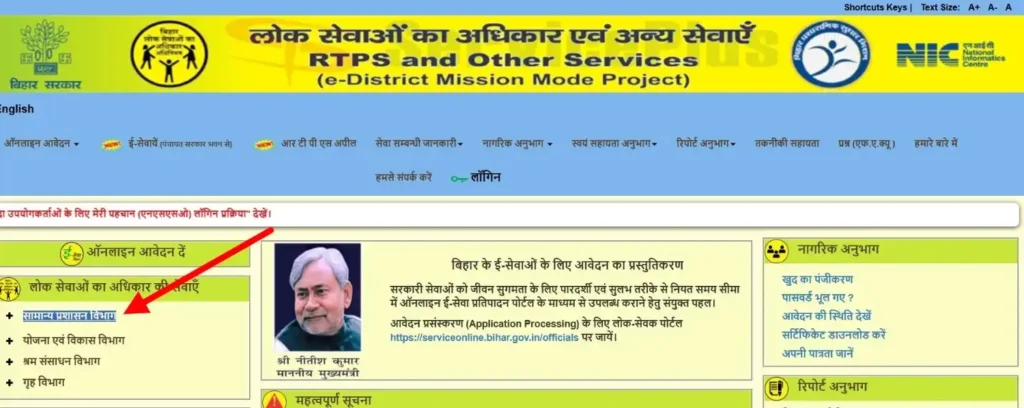
- Select Service: Click on “Issuance of Residential Certificate” (आवासीय प्रमाण-पत्र का निर्गमन).
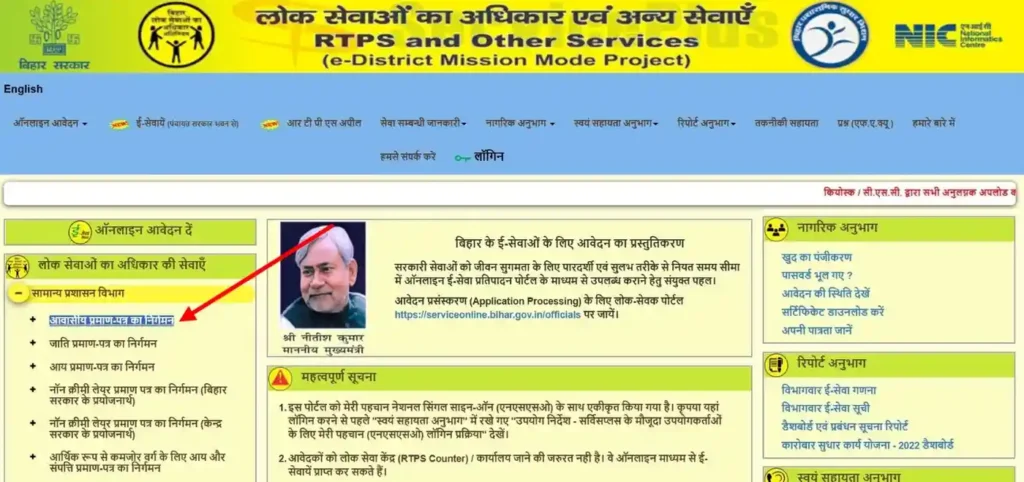
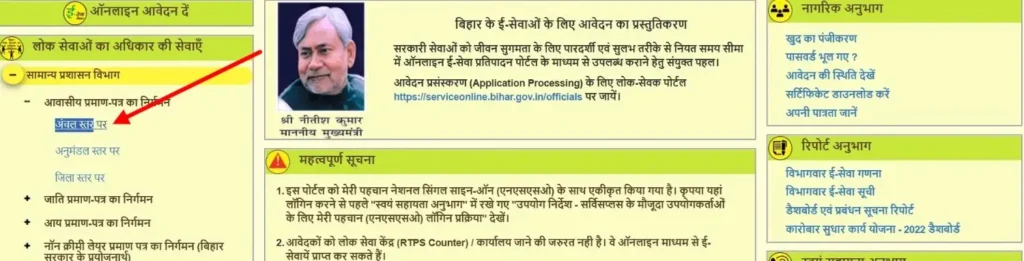
- Choose Level: Select “Revenue Officer Level” (अंचल स्तर) for your initial application.
- Form Tips: The form is primarily in Hindi, but you can type your name in English. Once you hit “Space” or “Tab,” the portal automatically converts it to Hindi. Always double-check this conversion for accuracy.
Caste Certificate (जाति प्रमाण पत्र) – SC/ST, OBC, & EBC
सरकारी नौकरियों और एजुकेशनल इंस्टीट्यूशन में रिज़र्वेशन पाने के लिए जाति प्रमाण पत्र ज़रूरी है।
Official Navigation Steps:
- Direct Access: From the Left Sidebar, navigate to “General Administration Department” (सामान्य प्रशासन विभाग).
- Path: Select “Issuance of Caste Certificate” (जाति प्रमाण-पत्र का निर्गमन).
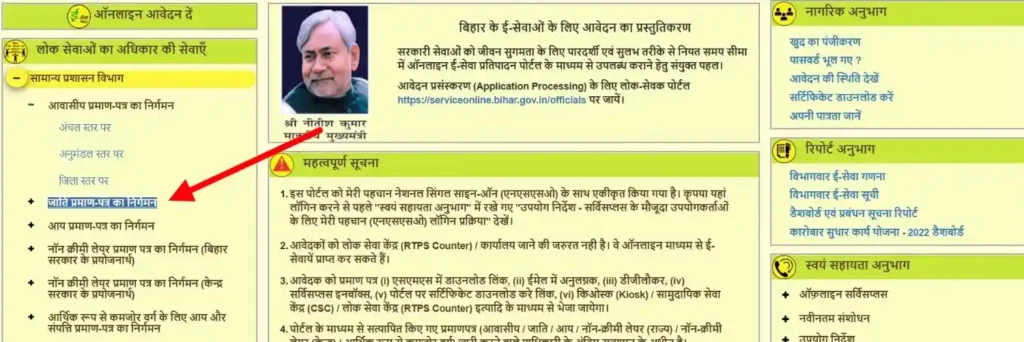
- Level: Always start with “Revenue Officer Level” (अंचल स्तर).
- Important Details: You will need to select your specific Category and Caste from a pre-defined dropdown list.
- Required Documents: Ensure you have a scanned copy of your Aadhar Card and a clear Passport Size Photograph (under 300KB) ready for upload.
Income Certificate (आय प्रमाण पत्र) – For Scholarships & Jobs
The Aay Praman Patra verifies your family’s annual earnings and is generally valid for one year.
Official Navigation Steps:
- Left Menu: Go to “General Administration Department” (सामान्य प्रशासन विभाग).
- Path: Click on “Issuance of Income Certificate” (आय प्रमाण-पत्र का निर्गमन).
- Level: Click on “Revenue Officer Level” (अंचल स्तर).
- Reporting Income: The form will ask for income from four specific sources: Salary, Agriculture, Business, and Other Sources. Even if your income is 0 in some categories, you must fill the fields to proceed.
- Language Check: Just like other certificates, names entered in English will auto-convert to Hindi on the right side of the input field.
Summary Table: Application Path
| Certificate Type | Side & Section | Official Option Name |
| Residential | Left Sidebar → RTPS Services | आवासीय प्रमाण-पत्र का निर्गमन |
| Caste | Left Sidebar → RTPS Services | जाति प्रमाण-पत्र का निर्गमन |
| Income | Left Sidebar → RTPS Services | आय प्रमाण-पत्र का निर्गमन |
एक्सपर्ट सलाह: अपना फ़ॉर्म सबमिट करने के बाद, हमेशा एक्नॉलेजमेंट स्लिप डाउनलोड करें। इस स्लिप में आपका एप्लीकेशन रेफरेंस नंबर होता है, जो आपका स्टेटस ट्रैक करने या अप्रूव होने के बाद फ़ाइनल सर्टिफ़िकेट डाउनलोड करने का एकमात्र तरीका है।
Specialized RTPS Services: NCL, EWS, and Character Certificates
बिहार RTPS पोर्टल डिफ़ॉल्ट रूप से लगभग पूरी तरह से हिंदी में है। अगर आप “स्पेशलाइज़्ड सर्विसेज़” जैसे इंग्लिश बटन खोज रहे हैं, तो आपको वे नहीं मिलेंगे। यहाँ साइट पर दिखने वाले हिंदी नामों का इस्तेमाल करके सही रास्ता बताया गया है।
Non-Creamy Layer (NCL) Certificate – Bihar vs. Central
सबसे बड़ी गलती गलत “मकसद” चुनना है। आपको इन खास हिंदी लाइनों को बाएं साइडबार में देखना होगा।
- For Bihar Govt Jobs (BC/EBC):
- Visit Link: serviceonline.bihar.gov.in
- Path: Left Sidebar → ऑनलाइन आवेदन (Online Apply) → लोक सेवाएँ (RTPS Services) → सामान्य प्रशासन विभाग (General Admin).
- Select: पिछड़ा वर्ग / अत्यंत पिछड़ा वर्ग (क्रीमीलेयर रहित) प्रमाण-पत्र का निर्गमन (बिहार सरकार के प्रयोजनार्थ).
- For Central Govt Jobs (OBC):
- Visit Link: serviceonline.bihar.gov.in
- Path: Same as above.
- Select: पिछड़ा वर्ग / अत्यंत पिछड़ा वर्ग (क्रीमीलेयर रहित) प्रमाण-पत्र का निर्गमन (केंद्र सरकार के प्रयोजनार्थ).
Gap Filler (Form 11): You must upload शपथ-पत्र (Form-XI).
- Download: Look for the link “स्वयं शपथ-पत्र” inside the application form. You must print, sign, and upload this, or your application will be rejected.
EWS (Economically Weaker Section) Certificate (ईडब्ल्यूएस प्रमाणपत्र)
For General category candidates, this is listed under “Income and Asset.”
- Visit Link: serviceonline.bihar.gov.in
- Path: Left Sidebar → ऑनलाइन आवेदन → लोक सेवाएँ → सामान्य प्रशासन विभाग.
- Select: आर्थिक रूप से कमजोर वर्ग के लिए आय और संपत्ति प्रमाण-पत्र का निर्गमन.
- Level: Always choose अंचल स्तर (Revenue Officer Level) for your first application.
Character Certificate (आचरण प्रमाण पत्र)
This is NOT under the General Administration section. Many people get lost here.
- Visit Link: serviceonline.bihar.gov.in
- Path: Left Sidebar → ऑनलाइन आवेदन → लोक सेवाएँ → गृह विभाग (Home Department).
- Select: आचरण प्रमाण-पत्र का निर्गमन.
- Verification: This requires a visit to your local थाना (Police Station).
EPDS Bihar: Ration Card Services
If the RTPS sidebar is too slow, you should go directly to the Ration Card portal.
- Visit Link: rconline.bihar.gov.in
- Login: Use your जनपरिचय (JanParichay) ID.
- Action: Select Apply (आवेदन करें) → New Apply (नया आवेदन).
RTPS Bihar Website Not Working?
अगर आप “व्हाइट स्क्रीन” देख रहे हैं या सबमिट करते ही “सेशन एक्सपायर” मैसेज आ रहा है, तो आप अकेले नहीं हैं। 2026 में, सर्विस प्लस बिहार पोर्टल भारत में सबसे ज़्यादा ट्रैफिक वाली सरकारी साइटों में से एक बना हुआ है। जब हज़ारों यूज़र एक साथ जाति, आय, या निवास सर्टिफिकेट के लिए अप्लाई करने की कोशिश करते हैं, तो सर्वर अक्सर जाम हो जाता है।
इससे पहले कि आप घबराकर साइबर कैफे जाएं, ये “ह्यूमन-वेरिफाइड” तरीके आज़माएँ जो सच में काम करते हैं।
1. Solving the “Session Expired” & “White Screen” Loop
यह सबसे ज़्यादा परेशान करने वाली गलती है। आप एक लंबा फ़ॉर्म भरते हैं, ‘आगे बढ़ें’ पर क्लिक करते हैं, और साइट आपको बाहर निकाल देती है।
- The Cause: The RTPS server times out your connection if it takes more than 5-7 minutes to fill the form, or if your browser cache is “clogged” with old session data.
- The Fix: Use Incognito Mode: Press
Ctrl + Shift + N(Chrome) orCtrl + Shift + P(Firefox). This prevents old cookies from interfering with the new application.- Switch to RTPS 4: If Server 1 is showing a white screen, immediately switch to RTPS 4 or RTPS 9. These mirrors often have lower traffic and a more stable “Handshake” with your browser.
- Clear Browser History: If you must use a standard tab, go to Settings → Privacy → Clear Browsing Data (select “All Time”).
2. Fixing “OTP Not Received” on Mobile
Waiting for that 6-digit code that never arrives?
- Check the DND Status: Ensure your mobile number isn’t blocking transactional SMS.
- The “JanParichay” Workaround: The portal uses MeriPehchaan (JanParichay) for login. If the Mobile OTP fails, try the Email OTP option. The email server is often faster than the local SMS gateway.
- Avoid Peak Hours: Between 10:00 AM and 5:00 PM, the SMS gateway is overloaded. Try applying before 8:00 AM or after 9:00 PM for an instant OTP.
3. Why Your Application “Failed” or “Rejected”
If you submitted the form but didn’t get a Reference Number (आवेदन संख्या), your application didn’t reach the database.
- Document Size Check: The #1 reason for “Application Failed” during upload is a file that is too large.
- Photo: Keep it under 50KB.
- Documents (Aadhar/Voter ID): Keep the PDF under 200KB.
- Language Auto-Conversion Error: When typing your name in English, you must press the [Space] bar for it to convert to Hindi. If the Hindi name remains blank or garbled, the server will reject the submission.
RTPS Bihar Application Status Check (Track by Ref No or OTP)
एक बार जब आप जाति, आय या निवास सर्टिफिकेट के लिए अपना फॉर्म जमा कर देते हैं, तो आपको उसकी प्रोग्रेस पर नज़र रखनी चाहिए। बिहार में, स्टेटस आमतौर पर “इनिशिएटेड” से “अंडर प्रोसेस” और आखिर में “डिलीवर” (निर्गत) हो जाता है।
Step-by-Step: आवेदन की स्थिति देखें (Track Application Status)
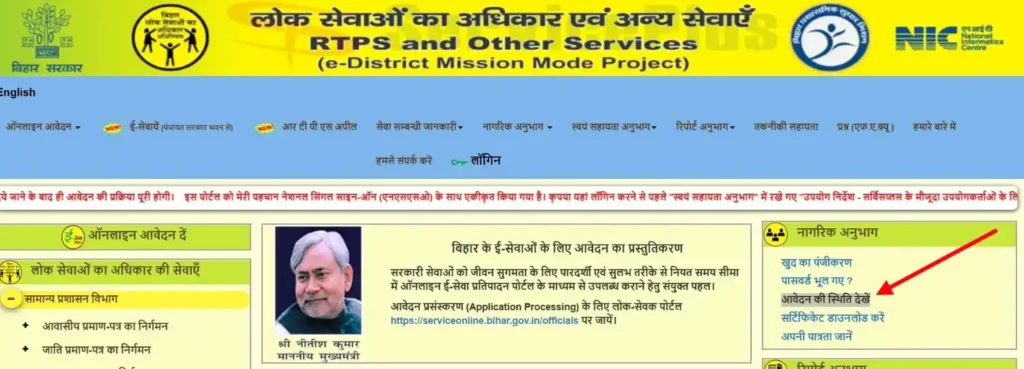
- Go to the Homepage: Open serviceonline.bihar.gov.in.
- Look to the Right Side: Find the box titled “नागरिक अनुभाग” (Citizen Section).
- Click the 3rd Link: Click on “आवेदन की स्थिति देखें” (View Application Status).
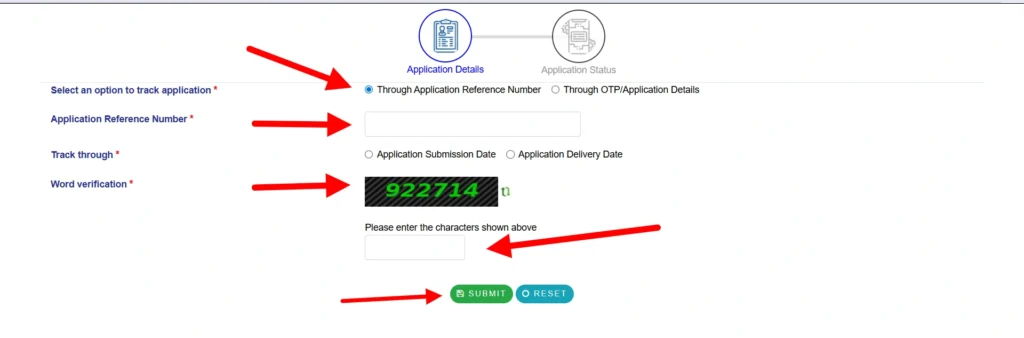
- Select Tracking Method: A new white window will open. Select the first circle: “Through Application Reference Number”.
- Fill the Data: Type your Application Reference Number (e.g., BRIC/2026/12345).
- Select “Application Submission Date” and pick the date from the calendar.
- Word Verification: Type the numbers shown in the image and click the blue “Submit” button.
How to Track Status Without Application ID? (Using Mobile/OTP)
अगर आपकी रसीद खो गई है, तो भी आप अपने फ़ोन नंबर का इस्तेमाल करके अपनी फ़ाइल ट्रैक कर सकते हैं।
- The Link Location: On the homepage, go to the Right Sidebar → नागरिक अनुभाग → “आवेदन की स्थिति देखें”.
- The Secret Option: Inside the tracking window, select the second circle: “Through OTP/Application Details”.
- Select Service: Pick your certificate type (e.g., Issuance of Caste Certificate) from the list.
- Personal Details: Type the Applicant’s Name and Father’s Name exactly as you wrote them in the form.
- OTP Verify: Click Submit. You will get a code on your mobile. Enter it to see if your officer has signed the document.
RTPS Certificate Download: Step-by-Step PDF Guide
Do not try to download your certificate until the status shows “Delivered” or “निर्गत”.
How to Download the Final Certificate: (फ़ाइनल सर्टिफ़िकेट डाउनलोड करें)
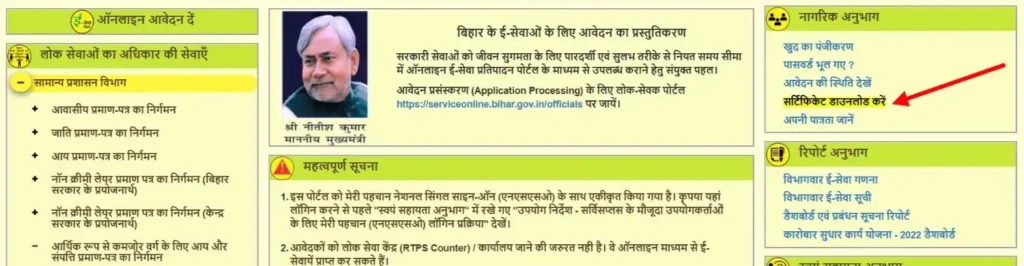
- The Link Location: Go to the serviceonline.bihar.gov.in homepage.
- Look to the Right Side: In the “नागरिक अनुभाग” (Citizen Section) box, look for the 4th link.
- Click the Link: Click on “सर्टिफिकेट डाउनलोड करें” (Download Certificate).
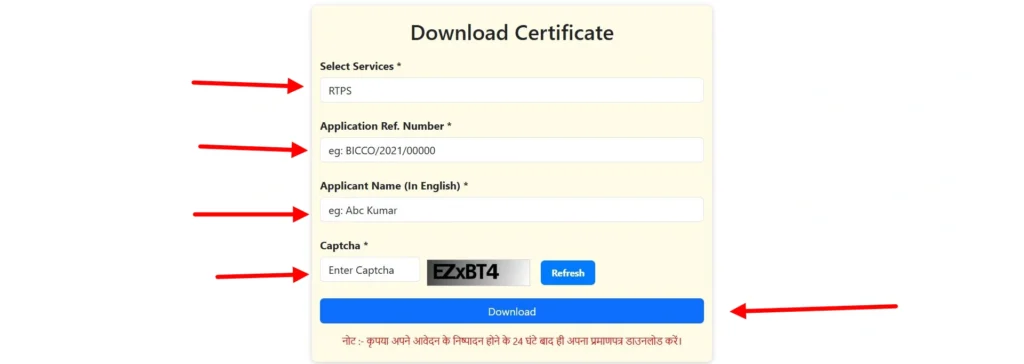
- Select Category: Ensure the dropdown says “RTPS”.
- Enter Application Ref Number: Type your full ID (e.g., BRCC/2026/XXXXX).
- Applicant Name (English): Type your name in English Capital Letters.
- Final Action: Click the blue “Download Certificate” button. Your PDF will start downloading immediately.
The “24-Hour” Rule for Blank PDFs
Even if the status says “Delivered,” many users in 2026 complain about receiving a Blank PDF or a “File Not Found” error.
- The Reason: The government server takes time to “attach” the digital signature to the public download link.
- The Solution: Wait exactly 24 hours after your status changes to “Delivered” before clicking the download link. This ensures the digital signature is fully synced and the PDF is valid.
Registration & Login: JanParichay / MeriPehchaan National SSO
बिहार RTPS पोर्टल पूरी तरह से नेशनल सिंगल साइन-ऑन (SSO) सिस्टम पर माइग्रेट हो गया है, जिसे मेरी पहचान (जन परिचय) के नाम से जाना जाता है। अब आप “लोकल” RTPS अकाउंट नहीं बनाते; इसके बजाय, आप एक यूनिफाइड पहचान बनाते हैं जो सभी भारतीय सरकारी सेवाओं में काम करती है।
अगर आप ServicePlus होमपेज पर सीधे पुराने 2023 या 2024 यूज़रनेम से लॉग इन करने की कोशिश करते हैं, तो शायद यह फेल हो जाएगा। अब आपको JanParichay गेटवे से जाना होगा।
How to create a new account on ServicePlus Bihar (सर्विसप्लस बिहार पर नया अकाउंट बनाएं)
अगर आप नए यूज़र हैं, तो आपको जाति, आय और निवास एप्लिकेशन के पूरे डैशबोर्ड को एक्सेस करने के लिए अपना मोबाइल नंबर और आधार डिटेल्स रजिस्टर करना होगा।
- Go to the Homepage: Open serviceonline.bihar.gov.in.
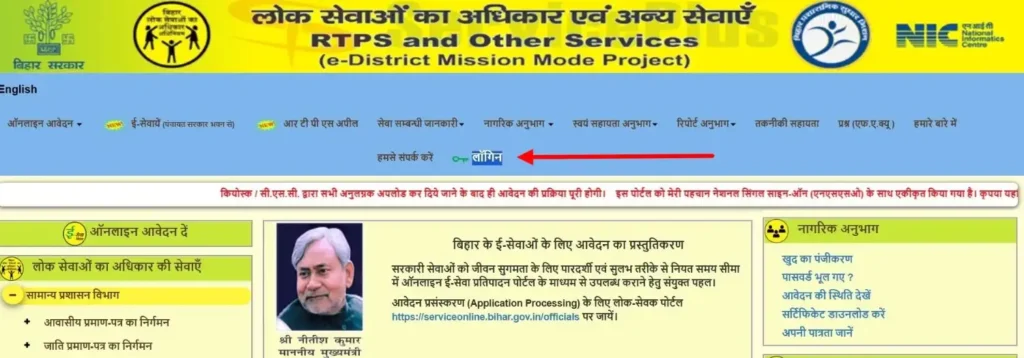
- Find the Top Menu: Look at the very top bar (Header) of the website.
- Click Login: Click on the link “लॉगिन” (Login).
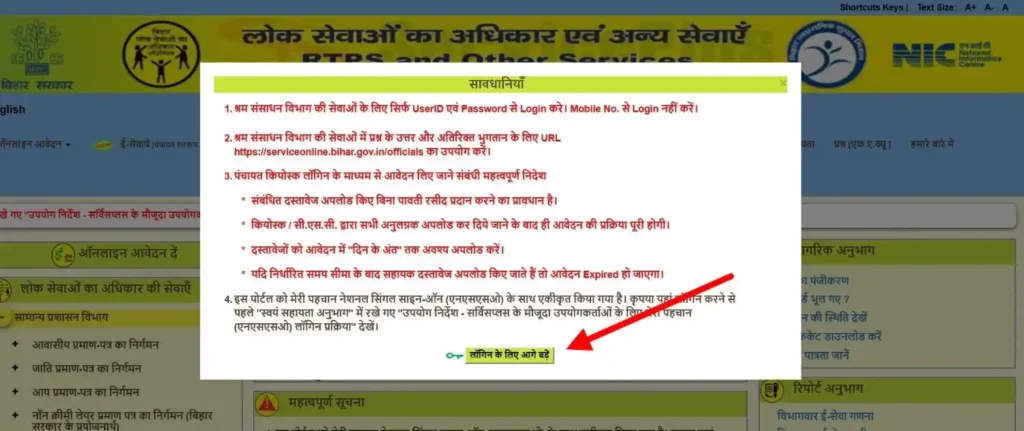
- Confirm the Prompt: A small box will appear with precautions. Click the blue button: “लॉगिन के लिए आगे बढ़ें” (Proceed for Login).
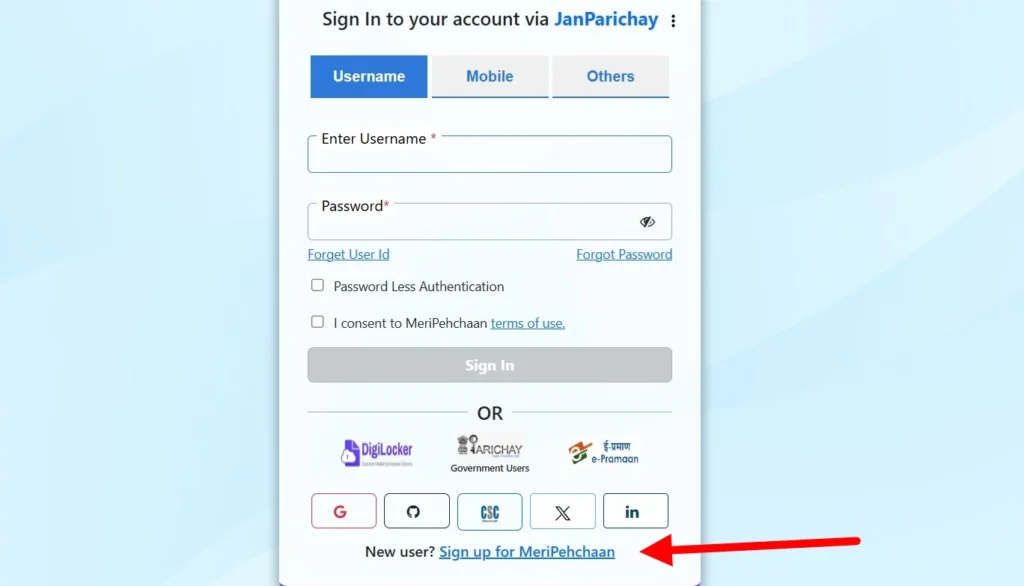
- The Redirect: You will be sent to the MeriPehchaan page. Scroll to the bottom and click on “New User? Sign up for MeriPehchaan”.
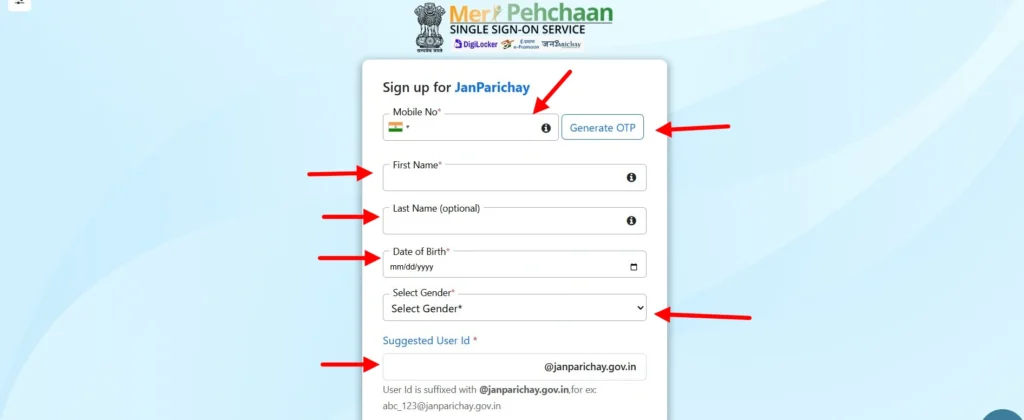
- Verify Mobile: Enter your 10-digit mobile number and click “Generate OTP”.
- Fill the Profile: Enter your First Name, Last Name, Date of Birth, and Gender.
- Create ID: Suggest a Username (e.g., yourname123) and set a strong Password.
- Complete Registration: Check the “I accept Terms and Conditions” box and click “Verify”. Your account is now active for all RTPS services.

Forgot Password? How to reset using Aadhaar-linked Mobile
क्या आपका एक्सेस चला गया? 2026 में, सिक्योरिटी के लिए रिकवरी प्रोसेस पूरी तरह से आपके आधार-लिंक्ड मोबाइल नंबर से जुड़ा होगा।
- Access the Login Page: Visit serviceonline.bihar.gov.in → लॉगिन → लॉगिन के लिए आगे बढ़ें.
- Find the Reset Link: On the JanParichay login screen, look below the “Sign In” button for “Forgot Password?”.

- Identify Yourself: Enter your Username or your Mobile Number.
- Authentication: Choose the option “OTP on Mobile”.
- Enter the Code: You will receive a 6-digit code from “AD-GENPRC”. Enter this on the screen.
- Set New Password: Create a new password. It must have at least one capital letter, one number, and one special character (e.g., Bihar@2026).
- Success: You can now go back to the homepage and log in to track your pending certificates.
Required Documents & File Size Optimization
सर्विस प्लस बिहार पोर्टल पर एप्लीकेशन रिजेक्ट होने का #1 कारण एलिजिबिलिटी नहीं है—यह गलत डॉक्यूमेंट फॉर्मेटिंग है। अगर आपकी फ़ाइल लिमिट से 1KB भी ज़्यादा है, तो सर्वर या तो क्रैश हो जाएगा या फ़ाइनल सबमिशन के दौरान “टाइम आउट” एरर दिखाएगा।
“पहली बार में सफलता” पक्का करने के लिए, अप्लाई बटन पर क्लिक करने से पहले यह चेकलिस्ट तैयार रखें।
Document Checklist
Depending on the service, you will need one or more of the following:
- Aadhaar Card: Must be linked to your mobile for e-KYC (Highly Recommended).
- Voter ID Card: A primary secondary proof for Residential (Niwas) certificates.
- Ration Card: Essential for family income verification in Aay Praman Patra.
- Land Possession Certificate (LPC): Mandatory for EWS and some specific Farmer-related services.
- Self-Declaration (Swa-Ghoshna): A signed PDF (Form-XI) required for all Non-Creamy Layer (NCL) applications.
Visual Guide: File Size Optimization Table
RTPS बिहार सर्वर फ़ाइल साइज़ को लेकर बहुत सख़्त है। इस टेबल को अपने फ़ोटो एडिटर या स्कैनर ऐप में अपनी फ़ाइनल “एक्सपोर्ट गाइड” के तौर पर इस्तेमाल करें।
| Document Type | Mandatory Format | Maximum File Size | Recommended Resolution |
| Applicant Photo | .JPG / .JPEG | Below 50 KB | 200 x 230 Pixels |
| Signature | .JPG / .JPEG | Below 20 KB | 140 x 60 Pixels |
| Supporting Documents | .PDF Only | Below 200 KB | 100 to 150 DPI |
एक्सपर्ट टिप: अगर आप मोबाइल फ़ोन इस्तेमाल कर रहे हैं, तो सिर्फ़ फ़ोटो लेकर अपलोड न करें। मोबाइल फ़ोटो आमतौर पर 3MB+ साइज़ की होती हैं, जिन्हें सर्वर रिजेक्ट कर देगा। साइज़ को ऊपर दिखाई गई लिमिट तक लाने के लिए “PDF Compressor” या “Image Resizer” टूल का इस्तेमाल करें।
FAQs
Can I apply for a Bihar Caste Certificate if I live in Delhi or another state?
हाँ। आप दुनिया में कहीं से भी ऑनलाइन पोर्टल के ज़रिए अप्लाई कर सकते हैं। लेकिन, आपका परमानेंट एड्रेस बिहार में होना चाहिए। वेरिफ़िकेशन अभी भी बिहार में आपके होम ब्लॉक के रेवेन्यू ऑफ़िसर (RO) द्वारा किया जाएगा।
What should I do if the RO rejects my application for “Incomplete Documents”?
Do not try to “edit” the rejected application. You must Apply Fresh.
1 – Check the “Remarks” section in your rejection status.
2 – Fix the specific issue (e.g., blurred Aadhar or missing Form-XI).
3 – Submit a new application. Re-applications are usually processed faster if you mention your previous Ref No. in the “Other Details” section.
Is there a fee for RTPS Bihar online services?
नहीं। ऑफिशियल serviceonline.bihar.gov.in पोर्टल के ज़रिए जाति, आय और निवास सर्टिफिकेट के लिए अप्लाई करना 100% फ्री सरकारी सर्विस है। अगर कोई थर्ड-पार्टी साइट या “एजेंट” “ऑफिशियल फीस” के लिए पैसे मांगता है, तो यह एक स्कैम है।
How many days does it take to get a certificate?
स्टैंडर्ड टाइमलाइन 10 से 15 वर्किंग डेज़ है। अर्जेंट ज़रूरतों के लिए, आप ऑनलाइन एप्लीकेशन के 5 दिन बाद अपने ब्लॉक IT मैनेजर के पास अर्जेंट प्रूफ़ (जैसे रिक्रूटमेंट एडमिट कार्ड) के साथ जा सकते हैं।
Why is my Aadhar authentication failing?
पक्का करें कि RTPS फ़ॉर्म पर आपका नाम और जन्मतिथि आपके आधार रिकॉर्ड से बिल्कुल मेल खाती हो। अगर स्पेलिंग में एक भी अंतर हुआ (जैसे, “संजीव” बनाम “संजीव”), तो e-KYC फेल हो जाएगा।
Can I track my application status via SMS?
हाँ, जब आपका एप्लीकेशन “अप्रूव्ड” या “डिलीवर” होता है, तो आपको आमतौर पर एक SMS मिलता है। हालाँकि, सर्वर लोड के कारण, SMS में अक्सर देरी हो जाती है। होमपेज पर “आवेदन की स्थिति देखें” लिंक का इस्तेमाल करके मैन्युअल रूप से चेक करना हमेशा सुरक्षित होता है।